> For the complete documentation index, see [llms.txt](https://wiki.cobblemonislands.com/llms.txt). Markdown versions of documentation pages are available by appending `.md` to page URLs; this page is available as [Markdown](https://wiki.cobblemonislands.com/features/chest-shops.md).
# Chest Shops
## How to create a shop
{% stepper %}
{% step %}
### Run the command
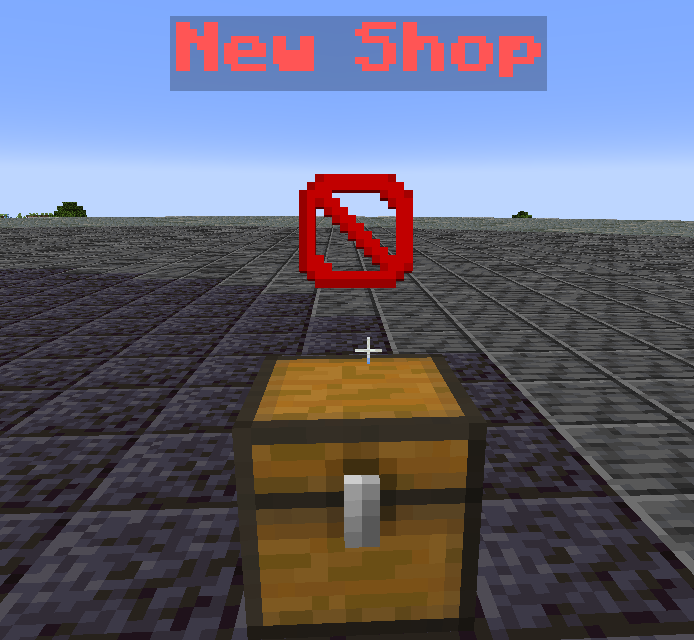
**Use the command: `/chestshop create`**
This will create a chest infront of you
{% endstep %}
{% step %}
### Right-Click the shop
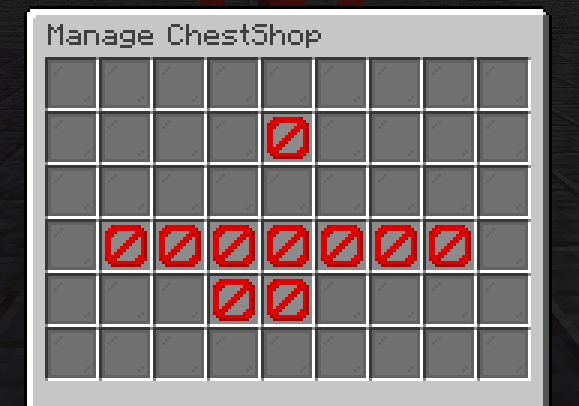
Right-clicking the shop to manage it!
### Manage options:
* Delete shop
* Delete the current shop, make sure to collect all items
* Teleport to shop
* Set a teleport to the shop players can use
* Buy enable/disable
* This allows player to **BUY** items from the chest
* Sell enable/disable:
* This allows players to SELL items same item you are selling TO the shop
* Set item
* Set the item you wish to sell in store.
* It will automatically open your Inventory for you to select the item, this will not remove the item from your inventory.
* Add stock
* Left click will automatically add 1 of the item
* Right-Click will add 16 of an item
* Shift Click will add all items matching to the sell item from your inventory
* Remove Stock
* Left click will remove 1 of the item
* Right-Click will remove 16 of an item
* Shift Click will remove all stock**, be sure to have enough space in your inventory.**
{% endstep %}
{% endstepper %}
### FAQ
## ❓ Chest Shop FAQ
Why didn’t a chest spawn when I used /chestshop create?
The chest will spawn **directly in front of you** when the command is run.
Make sure:
* There is **empty space in front of you**
* You are **not looking at a blocked area**
If the space is blocked, the shop will not be created.
How many shops can I create?
Players can create **up to 5 Chest Shops** by default.
In the future, **Shop Limit Vouchers** will be available that allow players to increase their shop limit.
Can I move my shop after creating it?
No. Shops cannot be moved once they are created.
If you want the shop somewhere else:
1. Remove all stock from the shop
2. Delete the shop
3. Create a new shop in the new location
What happens if I delete my shop?
Deleting a shop **removes the chest permanently**.
⚠ **Important:**\
Make sure to **collect all items and stock before deleting the shop**, otherwise they may be lost.
Why can't players buy items from my shop?
Make sure **Buy is enabled** in the shop settings.
If **Buy is disabled**, players will not be able to purchase items from the shop.
Why can't players sell items to my shop?
Check that **Sell is enabled**.
Sell mode allows players to **sell the same item your shop sells back to the shop**.
Can players sell different items to my shop?
No.
Players can only sell **the exact same item that your shop is configured to sell**.
Why does my shop say it has no stock?
Your shop must contain items in its **stock inventory**.
Use **Add Stock** to add items to your shop.
Does adding stock remove items from my inventory?
Yes.
Adding stock **moves items from your inventory into the shop storage**.
What happens if my inventory is full when removing stock?
If your inventory is full, the system may **fail to remove items from the shop**.
Always make sure you **have enough space in your inventory** before removing stock.
Can I change the item my shop sells later?
Yes.
You can use **Set Item** to change the product your shop sells.
However, it is recommended to **remove any existing stock first** before changing the item.
What does "Teleport to Shop" do?
This feature allows you to set a **teleport location for your shop**.
Players can use this teleport to **quickly travel to your store**.
Can I sell multiple items in one shop?
No.
Each shop can **only sell one item type at a time**.
If you want to sell multiple items, you will need **multiple shops**.
### TIPS
{% hint style="info" %}
#### You can sell Shulkers with items inside
If you wish to sell "bundles" the items have to be place exaclty in the same position as the "Selling item"
You can sell armor sets with this, by using the same mechanism as describe above.
{% endhint %}
{% hint style="info" %}
#### Do not sell enchanted items
The shop does not sell items enchated, but will purchase them. if you remove the items from the shop they will be unenchanted.
{% endhint %}
---
# Agent Instructions
This documentation is published with GitBook. GitBook is the documentation platform designed so that both humans and AI agents can read, navigate, and reason over technical content effectively. Learn more at gitbook.com.
## Querying This Documentation
If you need additional information that is not directly available in this page, you can query the documentation dynamically by asking a question.
Perform an HTTP GET request on the following URL with the `ask` and `goal` query parameters:
```
GET https://wiki.cobblemonislands.com/features/chest-shops.md?ask=&goal=
```
`ask` is the immediate question: it should be specific, self-contained, and written in natural language.
`goal` is what the user is ultimately trying to achieve, the reason they need the answer. Sharing it helps GitBook give you a better, more relevant answer. A goal is most helpful when it describes the outcome the user wants rather than restating the question. For example, with `ask=how do I create an API token`, a goal like `build a script that syncs our docs to a CMS` lets GitBook tailor the answer to that use case.
The response will contain a direct answer to the question and relevant excerpts and sources from the documentation.
Use this mechanism when the answer is not explicitly present in the current page, you need clarification or additional context, or you want to retrieve related documentation sections.